
Best Open-Source Notion Alternatives in 2026: Self-Hosted, Private & Free Options
Looking for open-source Notion alternatives? Compare AppFlowy, AFFiNE, Anytype, Docmost, and SiYuan for local-first privacy, databases, and self-hosting.
Best Open-Source Notion Alternatives in 2026: Self-Hosted, Private & Free Options
Notion redefined personal and team productivity by bundling documents, relational databases, wikis, and project management into a single modular canvas. Yet, as workspaces expand, user dissatisfaction with Notion has surged. Users face recurring pain points: mandatory cloud storage with no client-side encryption, notoriously fragile offline functionality, creeping subscription costs ($10 to $18 per user monthly plus extra fees for Notion AI), and occasional Electron performance slowdowns on extensive databases.
In 2026, the open-source software ecosystem offers mature alternatives. Whether you need an offline-first desktop workspace, an end-to-end encrypted personal knowledge graph, or a self-hosted team wiki running on your private VPS, there are viable solutions available.
However, choosing a replacement requires technical honesty: Notion is not merely a markdown notepad. It is an object-oriented document engine backed by multi-view relational databases. Many applications promoted as “Notion alternatives” handle basic notes while lacking database relations, multi-property rollups, or multiplayer collaboration.
In this guide, we evaluate the best open-source and self-hostable Notion alternatives, verify their actual licenses, compare database and offline capabilities, and help you select the right architecture for your data.
Quick Answer: Best Open-Source Notion Alternatives by Use Case
- Best Overall 1:1 Notion Alternative: AppFlowy (Built on Flutter and Rust, local-first by default, features Grid tables, Kanban boards, and Calendar views).
- Best for Visual Thinkers & Hybrid Workspaces: AFFiNE (Merges structured block documents with an infinite whiteboarding canvas in a unified workspace).
- Best for Privacy & Cryptographic Ownership: Anytype (Local-first, peer-to-peer sync, end-to-end encrypted, object-based data architecture).
- Best for Self-Hosted Team Wikis & Knowledge Bases: Docmost (Docker-deployable in minutes, real-time multiplayer co-authoring, spaces, and permissions).
- Best for Technical Researchers & Block-Level Linking: SiYuan (Block-level bidirectional links, built-in SQL queries, local JSON storage).
Comparison Table: Open-Source & Self-Hosted Notion Alternatives
| Tool | Primary Focus | Database Support | Real-Time Collaboration | Offline Mode | Self-Hosting Method | Verified License | Free Plan / Local Use |
|---|---|---|---|---|---|---|---|
| AppFlowy | Modular Workspace & Tasks | Table (Grid), Kanban, Calendar | Yes (Cloud or Self-Hosted) | 100% Native Local-First | Docker (appflowy-cloud) |
AGPLv3 (Client) / Open-Core | Free unlimited local use; Cloud free tier |
| AFFiNE | Docs + Whiteboard Hybrid | Table, Kanban views | Yes (Cloud or Self-Hosted) | 100% Native Local-First | Docker (affine/affine) |
MIT (Core/UI) / EE Proprietary (Backend) | Free local workspaces; 10 GB free cloud |
| Anytype | Encrypted Knowledge Graph | Sets & Collections (Multi-view) | P2P Async Sync (No live multi-cursor) | 100% Native Local-First | Docker (any-sync node) |
ASAL (Source-Available Client) / MIT (Protocols) | Free local use; 100 MB free remote sync |
| Docmost | Team Documentation & Wiki | None (Text tables only) | Yes (Live Multi-cursor) | Web-dependent (No native offline) | Docker Compose | AGPLv3 (Core) / EE Proprietary | Free open-source self-hosted |
| SiYuan | Personal Knowledge Management | Attribute Views & SQL Tables | Async Sync (WebDAV/S3/Cloud) | 100% Native Local-First | Docker / Desktop executable | AGPLv3 | Free local use; $64 one-time for S3/WebDAV |
| Outline | Fast Enterprise Documentation | None (Wiki only) | Yes (Live Multi-cursor) | Web-dependent (No native offline) | Docker / Kubernetes | BSL 1.1 (Source-Available) | Free community self-hosted |
What Makes Notion Hard to Replace?
Before replacing Notion, it is critical to catalog what Notion actually does under the hood. A successful migration depends on identifying which of these features you depend on daily:
- Relational Databases with Properties: Notion allows you to create a database of “Projects” and link it to “Tasks,” rolling up progress percentages, summing budgets, and calculating deadlines using formula expressions (Formulas 2.0). Most markdown note-taking apps cannot replicate this behavior.
- Multi-View Representation: A single underlying data collection can be viewed simultaneously as a Kanban board, a chronological Calendar, a Gallery with image previews, or a filtered List.
- Block-Level Canvas: Every paragraph, callout box, toggle list, and embedded media file is a discrete block that can be dragged, referenced, converted, or styled.
- Multiplayer Live Collaboration: Real-time multi-cursor editing, inline comments, user mentions, and granular workspace permissions.
- Ecosystem & API Integrations: A mature ecosystem of web clippers, automated workflows via webhooks, and pre-built templates.
flowchart TD
    StartChoice{"What is your primary reason to leave Notion?"}

    StartChoice -->|"Strict Offline & Personal Privacy"| OfflinePath{"Do you need multi-table databases?"}
    StartChoice -->|"Team Collaboration & Documentation"| TeamPath{"Do you need databases or a team wiki?"}
    StartChoice -->|"Visual Thinking & Infinite Canvas"| CanvasChoice["AFFiNE<br>(Doc + Whiteboard Hybrid)"]

    OfflinePath -->|"Yes (Tables, Kanban & Boards)"| AppFlowyChoice["AppFlowy<br>(Flutter + Rust, Local-First)"]
    OfflinePath -->|"Yes, with E2EE & Knowledge Graph"| AnytypeChoice["Anytype<br>(Local-First P2P, E2EE)"]
    OfflinePath -->|"Yes, with SQL & Block References"| SiYuanChoice["SiYuan<br>(Local JSON, SQL Queries)"]
    OfflinePath -->|"No, Markdown Notes Only"| JoplinChoice["Joplin / Notesnook<br>(E2EE Note Taking)"]

    TeamPath -->|"Databases & Project Management"| TeamDBChoice{"Are you willing to pay for / self-host a server?"}
    TeamPath -->|"Fast Knowledge Base & Company Wiki"| DocmostChoice["Docmost or Outline<br>(Real-Time Wiki Spaces)"]

    TeamDBChoice -->|"Self-Host Open-Core Backend"| AppFlowyServer["AppFlowy Cloud / AFFiNE Server<br>(Docker Deployment)"]
    TeamDBChoice -->|"Heavy Relational Data Needs"| NotionStay["Stay on Notion / Use Baserow<br>(Mature Formulas & Rollups)"]
Deep Dive: The Top Open-Source Notion Alternatives
1. AppFlowy: The Closest Drop-In Open-Source Alternative
AppFlowy (AppFlowy-IO/AppFlowy on GitHub) was created specifically as an open-source, local-first alternative to Notion. Built with a Flutter frontend and a high-performance Rust backend, AppFlowy resolves Notion’s noticeable Electron lag, offering near-instantaneous page rendering and document opening times.
Core Strengths
- Familiar User Interface: If you know Notion, AppFlowy requires virtually zero onboarding. Slash commands (
/), nested document hierarchies, cover images, icons, and keyboard shortcuts operate identically. - Database Views: Supports Grid (Table), Board (Kanban), and Calendar views. You can configure custom column properties such as text, single-select tags, multi-select, dates, checkboxes, and URLs.
- Local-First by Design: Documents and databases are stored locally on your machine in SQLite and raw files. It functions seamlessly without an active internet connection.
- Native Cross-Platform: High-performance desktop binaries for macOS, Windows, and Linux, alongside functional mobile apps for iOS and Android.
Where It Falls Short of Notion
- Relational Depth: While AppFlowy handles standalone tables and boards capably, advanced database relations (linking two databases together) and automated property rollups are still maturing compared to Notion’s sophisticated Formulas 2.0.
- Licensing Nuance: The desktop and mobile clients are licensed under AGPLv3. However, the multi-user self-hosted backend (
AppFlowy-SelfHost-Commercial) utilizes an open-core commercial licensing model for enterprise multi-tenancy. - Ecosystem Integrations: Lacks Notion’s vast library of third-party SaaS integrations (such as native Slack triggers or Zapier connectors). For workflow automation, teams often link local data via tools discussed in our review of Best Workflow Automation Software in 2026.
2. AFFiNE: The Hybrid Doc, Canvas, and Table Workspace
AFFiNE (toeverything/AFFiNE on GitHub) positions itself as an “all-in-one workspace where Notion meets Miro.” Built on the BlockSuite editor framework and Rust-based state management, AFFiNE addresses users who find Notion’s vertical document structure too rigid for creative ideation.

Core Strengths
- Dual-Mode Canvas (Page & Edgeless): Every document in AFFiNE can toggle instantly between a vertical block document (Page Mode) and an infinite whiteboard canvas (Edgeless Mode). You can draft a project brief in document mode, switch to whiteboard mode, and draw mind maps, flowcharts, or sticky notes around the text.
- Database Collections: Integrated Table and Kanban views allow users to track tasks, organize assets, and filter properties within document pages.
- Local-First & Multi-Platform: Stores data locally in modern indexed databases with zero latency. Pre-compiled binaries exist for macOS, Windows, Linux, and web browsers.
- Self-Hosting Availability: Developers can deploy AFFiNE Server via Docker to synchronize data across devices and invite team members.
Where It Falls Short of Notion
- Database Complexity: Like AppFlowy, AFFiNE’s database engine is optimized for task lists and collections rather than deep relational data modeling across disparate workspaces.
- License Composition: While the frontend editor (BlockSuite) and desktop shell are permissive MIT, backend server modules (
packages/backend) are governed by a proprietary Enterprise Edition license restricting unauthorized commercial redistribution.
3. Anytype: The Cryptographically Private Object Network
Anytype (anyproto on GitHub) approaches productivity through an entirely different paradigm. Rather than organizing data as isolated pages inside a centralized cloud database, Anytype treats all notes, tasks, bookmarks, and documents as Objects interconnected through a decentralized, cryptographic graph.
Core Strengths
- Zero-Knowledge Privacy: You do not register with an email address or password. Workspaces are protected by a 12-word cryptographic seed phrase. All data is end-to-end encrypted (E2EE) before leaving your hardware.
- Sets and Collections as Databases: Rather than creating a static table, Anytype lets you define “Sets” based on object types and relations (e.g., “Show all Objects where Type = Book and Status = Reading”). Sets support Table, Kanban, Gallery, and List views.
- Peer-to-Peer Synchronization: Syncs directly over local networks (LAN) between your laptop and phone without touching a cloud server. For remote sync, Anytype provides encrypted backup nodes (100 MB free remote storage, expandable via paid tiers or self-hosted
any-syncnodes). - Speed: The desktop application is exceptionally fast, utilizing local SQLite storage and Go/Rust background daemons (
anytype-heart).
Where It Falls Short of Notion
- Multiplayer Collaboration: Anytype is designed primarily for personal knowledge management and small shared spaces. It does not support simultaneous, real-time multi-cursor document co-authoring in the manner of Notion or Google Docs.
- No Web Version: Because Anytype relies on local cryptography and on-device storage, there is no generic web-browser client; you must install the native desktop or mobile application.
- License Model: The underlying synchronization protocol (
any-sync) is open-source (MIT), but the client applications are released under the Any Source Available License (ASAL 1.0), which restricts commercial redistribution.
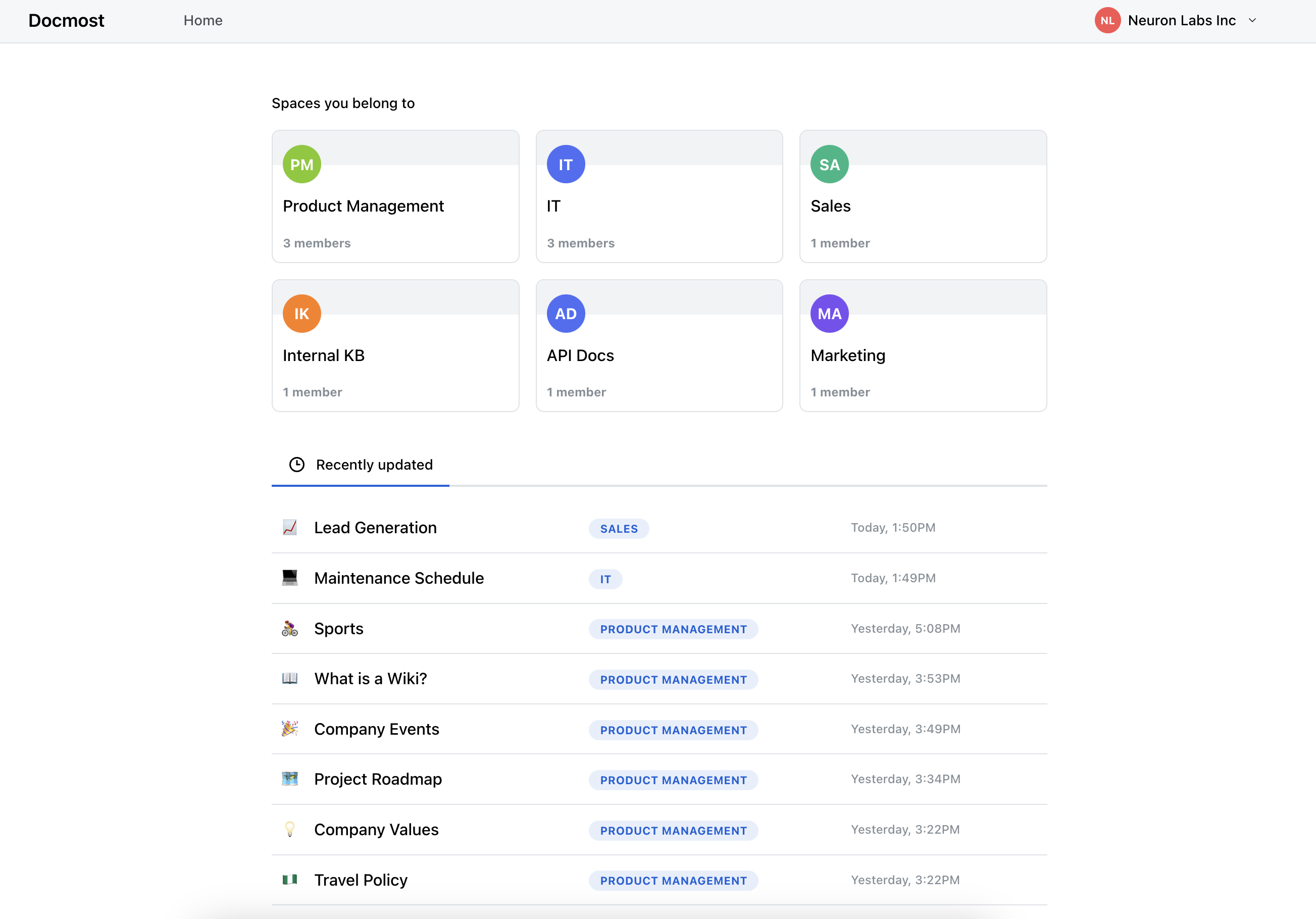
4. Docmost: The Modern Self-Hosted Team Wiki
Docmost (docmost/docmost on GitHub) was developed to challenge Notion and Confluence in the team documentation, company wiki, and collaborative knowledge base market.
Core Strengths
- Effortless Self-Hosting: Docmost can be deployed via Docker Compose in under five minutes with a simple configuration stack (Node.js, PostgreSQL, and Redis).
- Multiplayer Real-Time Co-Editing: Provides seamless, live multi-cursor collaboration with instant conflict resolution, user presence avatars, and page version history.
- Spaces and Permissions: Workspaces are organized into modular “Spaces” (e.g., Engineering, Marketing, HR) with granular role-based access control.
- Rich Embeds & Diagrams: Built-in native support for Mermaid diagrams, Draw.io canvases, Excalidraw whiteboards, and math formatting.
Where It Falls Short of Notion
- Zero Database Functionality: Docmost is strictly a documentation and wiki platform. It does not feature Kanban boards, relational tables, custom metadata properties, or calendar views.
- Web-Dependent Architecture: Docmost requires an active connection to your server; it does not offer a standalone offline-first local desktop client.
5. SiYuan: Block-Level Personal Knowledge Management with SQL
SiYuan (siyuan-note/siyuan on GitHub) is an open-source, local-first personal knowledge management (PKM) suite built around a strict block-level data model.
Core Strengths
- Atomic Block Structure: In SiYuan, every single paragraph, table cell, list item, or heading receives a unique block ID. Blocks can be embedded, linked bidirectionally, or referenced across multiple notebooks.
- Attribute Views (Databases): Includes an attribute view system that functions similarly to Notion databases, supporting sorting, filtering, formulas, and multiple layout views.
- Built-In SQL Query Engine: Developers and data-heavy researchers can query their entire knowledge base using native SQL syntax, pulling dynamic lists of blocks matching complex tag and attribute criteria.
- Complete Offline Ownership: All data is saved as plain JSON files and SQLite indexes in your local file system, ensuring total vendor independence.
Where It Falls Short of Notion
- Sync Licensing Gate: While the core desktop application is 100% open-source under AGPLv3, unlocking third-party synchronization (connecting the app to your own private S3 bucket, Cloudflare R2, or WebDAV server) requires a one-time purchase of a SiYuan PRO license ($64 lifetime).
- Interface Complexity: The user interface features significant density and technical configuration, which can overwhelm casual users transitioning from Notion’s minimalist aesthetic.
Architectural Comparison: Local-First vs. Self-Hosted vs. Cloud
When evaluating Notion alternatives, understanding the architectural tradeoffs between deployment models is crucial for data governance:
| Architectural Trait | Centralized Cloud (Notion) | Self-Hosted Server (Docmost, Outline) | Local-First (AppFlowy, Anytype, SiYuan) |
|---|---|---|---|
| Data Storage Location | Vendor’s multi-tenant AWS servers | Your private VPS or on-premises server | Directly on your local SSD/hard drive |
| Offline Performance | Poor; relies on temporary browser cache | Unavailable; requires connection to server | 100% Native; full read/write offline |
| Server Maintenance Required | Zero maintenance | Moderate (Docker updates, SSL, backups) | Minimal to zero (App manages local storage) |
| Privacy & Sovereignty | Data unencrypted at rest from vendor | Total operational control by your admins | End-to-end encrypted or completely local |
| Multi-User Co-Authoring | Instant, seamless | Instant, seamless | Asynchronous or requires hosted sync server |
| Mobile & Cross-Device Sync | Automatic cloud sync | Managed via server connection | Peer-to-peer or via configured sync node |
For developers managing agentic workflows and local tools, see our analysis of How to Use MCP in OpenCode and Best Open-Source AI Coding Tools.
Migrating from Notion: What Transfers and What Breaks?
Notion’s export utility allows users to download their workspace as HTML, Markdown & CSV, or PDF. While migrating simple text documents is straightforward, migrating structured workspaces involves notable limitations:
flowchart TD
    A["Notion Export Package"]
    A --> B["Markdown Pages (.md)"]
    A --> C["Media Attachments"]
    A --> D["CSV Databases (.csv)"]
    A --> E["Relations, Rollups, and Formulas"]

    B --> F["Check Import Compatibility"]
    C --> G["Preserve Files and Relative Paths"]
    D --> H["Review Properties and Structure"]
    E --> I["Check Which Data Can Be Preserved"]

    F --> J["Import Into Target Application"]
    G --> J
    H --> J
    I --> K["Rebuild Unsupported Features"]
    K --> J
1. What Migrates Successfully
- Text Formatting & Hierarchy: Headings (H1–H3), bold, italic, code fences, blockquotes, and numbered lists convert cleanly via Markdown.
- Nested Folders: Subpages export as nested folders containing Markdown documents, which tools like AppFlowy and Docmost ingest with folder hierarchies intact.
- Basic Flat Tables: Standard columns (Text, Number, Select, Date, Checkbox) export as CSV files and can be imported into AppFlowy or AFFiNE collections.
2. What Breaks During Migration
- Relational Database Links: In Notion’s CSV export, related database records are flattened into plain text strings. Links between projects and tasks are severed and must be re-linked manually.
- Formulas and Rollups: Live formulas (Notion Formulas 2.0) export as static calculated text values rather than dynamic equations.
- Third-Party Embeds: Interactive embeds (Figma files, Google Drive previews, Loom videos) revert to plain hyperlinks.
- Workspace Permissions: User permissions, guest access, and team access rules must be reconfigured from scratch in your target tool.
Video Walkthrough: Open-Source Workspaces
To see how modern open-source workspaces handle document editing, task boards, and local synchronization in real-world workflows, watch this comprehensive technical review:
When Does It Make Sense to Stay with Notion?
Open-source alternatives offer superior privacy and offline reliability, but staying with Notion remains the pragmatic choice under specific organizational circumstances:
- Complex Relational Database Architectures: If your business operations depend on deeply nested relational tables, multi-variable Formulas 2.0, and automated rollups across ten interconnected databases, open-source alternatives will require painful structural compromises.
- Extensive SaaS Integrations: If your team relies on Zapier, Make, Slack bots, GitHub sync, or Jira widgets directly writing to Notion pages, replicating those integrations in self-hosted environments requires significant custom development.
- Zero-Maintenance Teams: If your organization lacks technical staff capable of managing Docker containers, maintaining PostgreSQL databases, and configuring reverse proxies, managing self-hosted infrastructure introduces unnecessary overhead.
- Heavy Collaboration Across Non-Technical Stakeholders: Notion’s comment threads, public page sharing, and mobile apps remain more polished for non-technical clients and external contractors.
Frequently Asked Questions
What is the best 1:1 open-source alternative to Notion?
AppFlowy is the closest direct alternative to Notion. It replicates Notion’s block-based slash command editing, sidebar hierarchy, Grid tables, Kanban boards, and Calendar views while providing native local-first offline execution.
Are all Notion alternatives 100% free and open-source?
No. Many tools use open-core or source-available licensing models. For example, AppFlowy’s client is AGPLv3, but its multi-user server uses a commercial license. AFFiNE’s editor is MIT, while its backend contains proprietary enterprise modules. Anytype uses the source-available ASAL 1.0 license for its desktop clients, and Outline is licensed under BSL 1.1. Always check specific repository license files.
Can I use open-source Notion alternatives completely offline?
Yes. Local-first tools like AppFlowy, AFFiNE, Anytype, and SiYuan store all documents directly on your device’s local drive (using SQLite or JSON files). They perform full read, write, edit, and query operations without requiring an active internet connection.
Do open-source alternatives support Notion's relational databases and formulas?
Only partially. AppFlowy, AFFiNE, and Anytype support structured properties, filtering, sorting, and multiple views (Kanban, tables). However, complex multi-database relations, rollups, and advanced algebraic formulas (such as Notion Formulas 2.0) are either rudimentary or still under active development.
How difficult is it to self-host an alternative like Docmost or AppFlowy?
For administrators familiar with Docker, deployment is straightforward. Docmost can be spun up using Docker Compose with PostgreSQL and Redis in under five minutes. AppFlowy and AFFiNE also provide official Docker templates, though configuring custom domains, SSL certificates, and S3 object storage requires basic systems administration experience.
Is Obsidian a true Notion alternative?
Obsidian is an exceptional local-first markdown note-taking app and personal knowledge management tool. However, it is not a direct Notion replacement out of the box because it lacks native multi-user real-time collaboration, hosted web access, and built-in visual database properties (though community plugins like Dataview can simulate some database queries). Furthermore, Obsidian is free for personal use but closed-source and requires commercial licenses for enterprise work.

Yan ZC
Software Developer & Tech Reviewer
Software developer and tech reviewer at ToolReview. I test, analyze, and document AI tools and software workflows. My mission is to help you find the perfect tech stack with honest reviews and rigorous benchmarks.