
ArtCraft Crafting Apps: The Open-Source Adobe Alternatives Explained
Explore ArtCraft Crafting Apps: seven open-source, pure-Rust creative tools replacing Adobe workflows. Learn their current status, MCP agent support, and limits.
ArtCraft Crafting Apps: The Open-Source Adobe Alternatives Explained
For creative professionals, digital artists, and software engineers, dissatisfaction with subscription software has reached an inflection point. Decades of compounding license fees, mandatory cloud sync, intrusive telemetry, and proprietary file lock-in have left designers searching for genuine alternatives to Adobe Creative Cloud. In October 2026, the team behind ArtCraft (storytold on GitHub) unveiled one of the most ambitious initiatives in modern open-source software: the Crafting Apps family.
Crafting Apps is a suite of seven native creative applications designed from the ground up in pure Rust to deliver clean-room, subscription-free, offline-first reimplementations of industry-standard creative workflows: PhotoCraft (Photoshop), VectorCraft (Illustrator), FilmCraft (Premiere Pro), LightCraft (Lightroom), PrintCraft (Acrobat), EffectCraft (After Effects), and DesignCraft (InDesign).

However, distinguishing open-source excitement from technical production reality requires objective clarity: ArtCraft’s Crafting Apps are an early-stage open-source suite in varying phases of Alpha and active development, not a turnkey drop-in replacement for Adobe Creative Cloud today.
In this technical architectural analysis, we examine what Crafting Apps actually are, dissect their pure-Rust foundation, verify what works today across all seven applications, evaluate their unique Model Context Protocol (MCP) agent automation, review file format compatibility, and assess who should test them today versus who must wait.
What Are ArtCraft Crafting Apps? Origins and Architecture
To understand the Crafting Apps suite, one must first clarify the entity relationship:
- ArtCraft: The parent organization and creative community developed by the storytold team (getartcraft.com). ArtCraft operates an AI-assisted generative studio that stages 2D canvases into 3D scenes.
- Crafting Apps: A distinct, standalone family of seven open-source creative desktop and web applications (getartcraft.com/apps). Unlike the parent company’s cloud-hosted AI generation services, Crafting Apps are local-first, native software tools built without mandatory accounts, external tracking, or cloud dependencies.
Core Architectural Pillars
Crafting Apps depart from both legacy commercial software and modern web-wrapped tools across four fundamental engineering decisions:
- Clean-Room Implementation: None of the Crafting Apps incorporate decompiled binary code or intellectual property from Adobe Inc. They are clean-room reimplementations built from public file specifications (ISO PDF standards, documented PSD byte structures, ITU audio metrics) and modern graphics algorithms.
- Native, Not Wrapped: Modern creative tools frequently ship inside an Electron container or a WebView wrapper, sacrificing memory efficiency and execution speed. Crafting Apps are compiled natively to CPU machine code on macOS, Windows, Linux, and FreeBSD, rendering directly to GPUs via the
wgpuabstraction layer across Metal, Vulkan, and DirectX 12. - Your Files, Your Machine: Documents stay on your local storage drive. There are no mandatory login gates, license authentication servers, or background telemetry daemons monitoring asset usage.
- Agent-Ready from the Core: Rather than relying on fragile mouse-click automation or computer-use vision models, every action in a Crafting App passes through an internal command registry. This allows the exact same rendering engine to be manipulated interchangeably by a human using a mouse, a terminal script via CLI, or an AI agent connecting over the Model Context Protocol (MCP).
flowchart TD
    subgraph ControlInterfaces["Control & Input Interfaces"]
        GUI["Native Desktop GUI / Wasm (wgpu / Native Windowing)"]
        CLI["Command Line Tools (printcraft-cli, photocraft-cli)"]
        MCPServer["MCP Server (Model Context Protocol for AI Agents)"]
        JSONChannel["JSON Control Channel (Headless Offscreen Driver)"]
    end

    subgraph CoreRegistry["Unified Command Bus (Pure Rust)"]
        CommandDispatcher["Atomic Command Registry & Event Dispatcher"]
        UndoRedo["Copy-on-Write State & Infinite History Stacks"]
    end

    subgraph DocumentEngines["Dedicated Document & Media Engines"]
        RasterEngine["PhotoCraft: Tiled GPU Compositor & PSD Engine"]
        VectorEngine["VectorCraft: Bézier Geometry & Pathfinder Operations"]
        VideoEngine["FilmCraft: Pure Rust Codecs & Integer Timeline Clock"]
        MotionEngine["EffectCraft: 306 Effects & Lottie Vector Importer"]
        PDFEngine["PrintCraft: Incremental Save & Script Shaper"]
        LayoutEngine["DesignCraft: Knuth-Plass Paragraph Composer"]
    end

    subgraph OutputSurfaces["Hardware & File Storage"]
        GPURenderer["Hardware Acceleration (Metal / Vulkan / DX12 / WebGPU)"]
        LocalDisk[("Local Storage: PSD, PDF, ecproj, vectorcraft, ProRes")]
    end

    GUI --> CommandDispatcher
    CLI --> CommandDispatcher
    MCPServer --> CommandDispatcher
    JSONChannel --> CommandDispatcher

    CommandDispatcher --> UndoRedo
    CommandDispatcher --> RasterEngine
    CommandDispatcher --> VectorEngine
    CommandDispatcher --> VideoEngine
    CommandDispatcher --> MotionEngine
    CommandDispatcher --> PDFEngine
    CommandDispatcher --> LayoutEngine

    RasterEngine --> GPURenderer
    VectorEngine --> GPURenderer
    VideoEngine --> GPURenderer
    MotionEngine --> GPURenderer
    PDFEngine --> GPURenderer
    LayoutEngine --> GPURenderer

    RasterEngine --> LocalDisk
    VectorEngine --> LocalDisk
    VideoEngine --> LocalDisk
    MotionEngine --> LocalDisk
    PDFEngine --> LocalDisk
    LayoutEngine --> LocalDisk
Current Status: Verified Application Matrix
Because ArtCraft’s suite is evolving rapidly, tracking the exact maturity of each tool is essential. The following status table reflects directly verified repository data:
| Application | Creative Workflow | Comparable Adobe Workflow | Current Status | Desktop Platforms | WebAssembly | Verified License |
|---|---|---|---|---|---|---|
| PhotoCraft | Raster Image Editing | Photoshop | Early Alpha (v0.2.0) | macOS, Windows, Linux, FreeBSD | Yes (Wasm) | MIT OR Apache-2.0 |
| PrintCraft | PDF Reading, Editing & Assembly | Acrobat | Early Alpha | macOS, Windows, Linux, FreeBSD | Yes (Wasm) | MIT OR Apache-2.0 |
| VectorCraft | Vector Illustration & Paths | Illustrator | In Active Development | macOS, Windows, Linux, FreeBSD | Yes (Wasm) | MIT OR Apache-2.0 |
| FilmCraft | Non-Linear Video Editing | Premiere Pro | Young & Moving Fast (Alpha) | macOS, Windows, Linux | Yes (Wasm) | MIT OR Apache-2.0 |
| LightCraft | RAW Development & Photo Catalog | Lightroom | Young & Moving Fast (Alpha) | macOS, Windows, Linux | Yes (Wasm) | MIT OR Apache-2.0 |
| EffectCraft | Motion Graphics & Compositing | After Effects | Young & Moving Fast (Alpha) | macOS, Windows, Linux | Yes (Wasm) | MIT OR Apache-2.0 |
| DesignCraft | Desktop Publishing & Page Layout | InDesign | In Active Development | macOS, Windows, Linux | Yes (Wasm) | MIT OR Apache-2.0 |
Status verified from official project repositories: October 6, 2026.
What Can You Actually Use Today?
There is a significant divide between an ambitious product roadmap and software you can run right now. Here is what early adopters can realistically test today:
1. Ready for Hands-On Testing (Early Alpha)
- PhotoCraft: The image editor can open, manipulate, and export layered PSD and PSB files. You can paint with brushes, configure 16 non-destructive adjustment layers, manipulate type, and run blur filters with real-time canvas previews.
- PrintCraft: The PDF workbench is already usable for reading complex multi-lingual PDFs, merging multiple files, splitting pages, and reordering sheets using visual drag-and-drop. Its dedicated CLI tool (
printcraft-cli) is functional for automated terminal workflows.
2. Functional from Source & Sample Documents
- VectorCraft: Renders intricate vector posters from code and sample files, demonstrating Bézier direct selection, live blends up to 70 steps, Pathfinder booleans, and radial repeats.
- FilmCraft: Capable of importing footage, performing 3-point timeline edits, dynamic JKL trimming, and real-time Lumetri-style color grading on public-domain footage using its built-in Rust codecs.
- EffectCraft: Executes timeline compositing with 306 parameter-matched effects, JavaScript expressions, and Lottie animations, outputting through an experimental render queue.
- LightCraft: Features a working 32-bit float OkLCh darkroom pipeline, performing highlights recovery, tone curve mapping, and catalog filtering across virtualized grids.
3. Early Engine Stage
- DesignCraft: Can lay out multi-column sample magazine spreads using its Knuth–Plass paragraph composer and CMYK process swatches. However, broader file interoperability (such as InDesign IDML import) remains on the active roadmap.
How do you run them? Users can clone the repositories and compile them locally using the Rust toolchain (cargo run --release), access browser previews compiled via WebAssembly, or download early release binaries available through the project’s GitHub releases.
The Seven Crafting Apps: Deep Dive
1. PhotoCraft: The Layered Raster Editor
PhotoCraft targets the complex raster image workflows traditionally dominated by Adobe Photoshop. Rebuilt in pure Rust 1.90+ (edition 2024), its architecture combines copy-on-write image tiles, multithreaded filters, and a wgpu compositor.
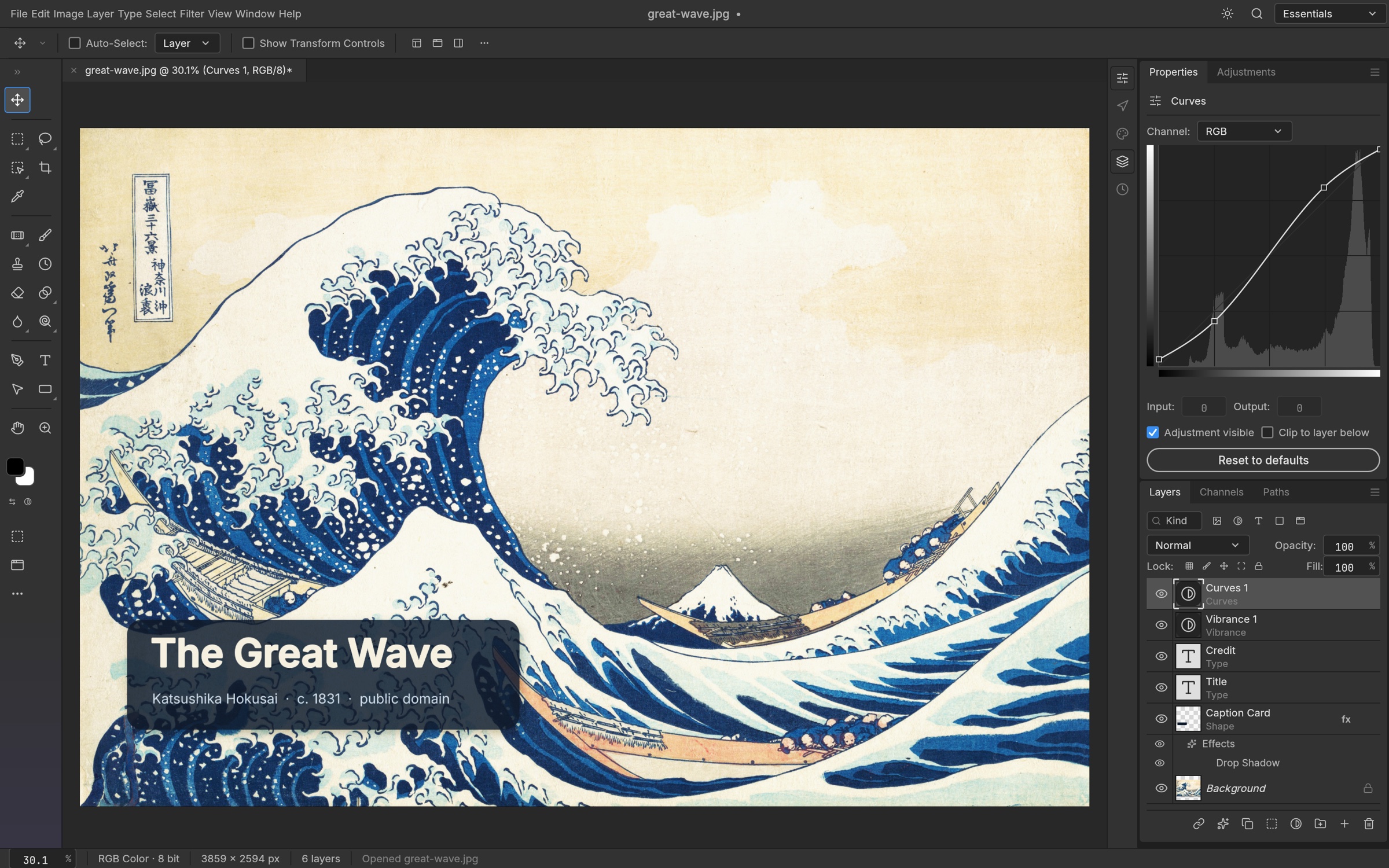
- PSD Fidelity: PhotoCraft was tested by its maintainers against the standardized
psd-toolstest corpus. According to the project’s documentation, re-saving preserves the visual render of 307 out of 309 test files, and 116 out of 116 vector shape layers match Photoshop’s rendering pixel-for-pixel. - Non-Destructive Adjustments: Features 16 adjustment layers (Levels with live histograms, Curves with per-channel spline editing, Vibrance, Black & White, Channel Mixer, Gradient Map, and 3D LUT Color Lookups supporting
.cube,.3dl, and.look). - Layer Styles: Full support for Drop Shadow, Inner Shadow, Outer/Inner Glow, Bevel & Emboss, Satin, Stroke, and Pattern Overlays (including
.patlibrary imports and PSDPattblocks). - Smart Selections: Includes standard marquees and lassos alongside local ML-assisted Object Selection and Select Subject tools that execute entirely on the local device without sending image data to cloud servers.
2. VectorCraft: Precision Bézier Illustration
VectorCraft reimagines the vector graphics workflow of Adobe Illustrator, focusing on clean geometry, mathematical snapping, and high-performance path computation.
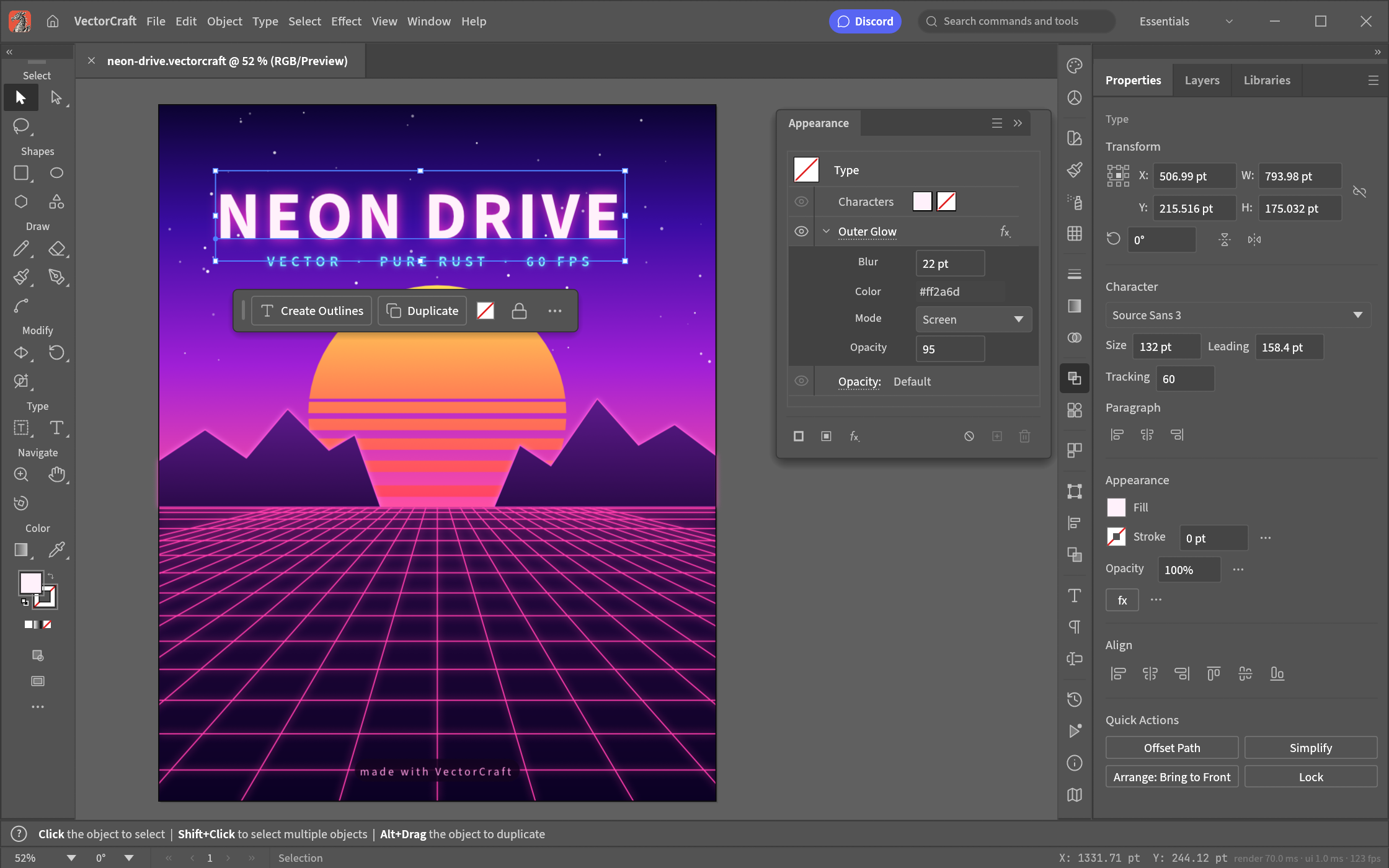
- Path Engine & Direct Selection: True Bézier anchor points with independent control handles, accompanied by a contextual task bar that updates dynamically based on active selections.
- Complex Appearance Stacks: Multiple fills, aligned strokes, dashed patterns, and live appearance effects (such as Outer Glow and clipping masks) applied non-destructively to single objects.
- Advanced Generators: Live Blends capable of calculating smooth transitions across up to 70 steps, live radial repeats for mandalas and circular graphics, Envelope Distort warps, and Gradient Meshes.
- Artboards & Documents: Supports multiple artboards within a unified workspace, saving natively into an open JSON-based
.vectorcraftformat while exporting clean SVG and raster assets.
3. FilmCraft: Non-Linear Video Editing Without FFmpeg
One of the most remarkable technical feats in the Crafting Apps suite is FilmCraft. While nearly all open-source video editors (such as Kdenlive or Shotcut) rely heavily on FFmpeg wrappers, FilmCraft implements its core video decoders and encoders directly in pure Rust from public ISO/IEC specifications.
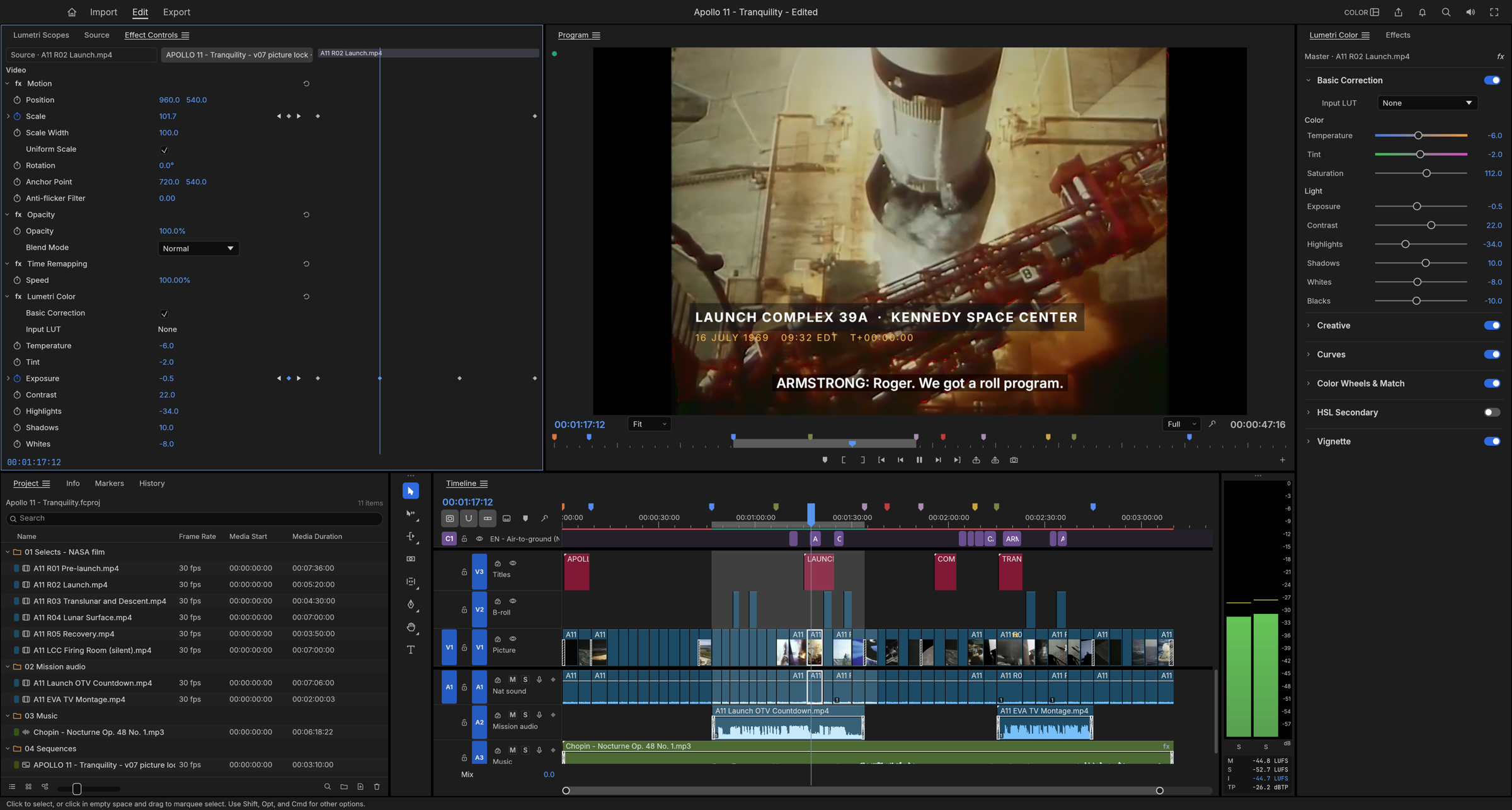
- Native Codec Engine: Implements independent, pure-Rust decoders and encoders for H.264, HEVC, ProRes, and AAC.
- Drift-Free Integer Clock: To eliminate the audio/video synchronization drift common in floating-point timeline math, FilmCraft operates on an exact clock rate of 254,016,000,000 integer ticks per second, which divides evenly into all standard broadcast and cinematic frame rates (23.976, 24, 25, 29.97 drop-frame, and 59.94 fps).
- Linear-Light Grading: A complete Lumetri-style grading panel operating in 32-bit linear float with real-time waveform and vectorscope monitors computed directly from the graded frame buffer.
- Broadcast Audio: Professional loudness meters conforming to ITU-R BS.1770 and EBU R128 standards, alongside native DSP audio effects including parametric EQ, true-peak limiters, and noise reduction.
4. LightCraft: 32-Bit Perceptual RAW Darkroom
LightCraft is designed for photographers who need a non-destructive RAW processor and catalog manager similar to Adobe Lightroom.
- OkLCh Color Pipeline: All color and tone computations occur within the OkLCh perceptual color space, preventing hue shifts when adjusting saturation or exposure.
- Edge-Aware Tone Mapping: The highlights and shadows recovery algorithm utilizes a guided filter on log-luminance, recovering blown-out skies without creating artificial gray halos around high-contrast edges.
- Targeted Masking: Local adjustments support brush painting, linear/radial gradients, and automated luminance range, color range, and sky/subject masks.
- Virtualized Photo Catalog: The photo library interface utilizes virtualized grids capable of smoothly rendering collections exceeding 40,000 images, complete with hierarchical album folders, star ratings (0–5), pick/reject flags, and structured metadata queries (
rating:>3 iso:>800).
5. PrintCraft: The Secure PDF Workbench
PrintCraft tackles Adobe Acrobat’s PDF manipulation workflows, emphasizing document safety, typographical fidelity, and multi-lingual text shaping.

- Atomic Incremental Saves: When modifying a PDF, PrintCraft appends modifications incrementally without rewriting or corrupting the original document bytes. Files are verified for structural integrity via automated tooling.
- Visual Page Assembly: The “Organize Pages” grid lets users reorder pages, rotate orientations, extract sheet ranges, split large files by page thresholds, and merge multiple documents while preserving interactive form fields and hyperlinks.
- Crash Resilience: Evaluated against the comprehensive 983-file
pdf.jstest corpus, the PrintCraft engine recorded zero crashes.
6. EffectCraft: Motion Graphics & Compositing
Targeting the motion graphics capabilities of Adobe After Effects, EffectCraft allows animators to build compositions, animate properties via keyframe graphs, and render visual effects.
- 306 Built-In Effects: Implements 306 visual and audio effects mirroring After Effects’ parameter ordering, grouping, and default values (including simulation tools like particle worlds, fractal noise, and time displacement).
- JavaScript Expressions: Incorporates an embedded JavaScript engine exposing the After Effects document object model, supporting expressions like
wiggle(),loopOut(), andthisComp.layer(). - Clean JSON Projects: Saves projects in
.ecproj, a human-readable, version-controlled JSON format that diffs cleanly in Git, alongside built-in native Lottie vector import and export.
7. DesignCraft: Knuth–Plass Typographical Layout
DesignCraft addresses the desktop publishing workflows of Adobe InDesign, focusing on multi-page book, brochure, and magazine layout.
- Knuth–Plass Paragraph Composer: Uses mathematical global paragraph optimization (the Knuth–Plass algorithm) to eliminate rivers of whitespace, paired with dictionary hyphenation based on the Moby word corpus.
- Spreads & Threading: Supports multi-page spreads, parent page templates, and threaded text frames that automatically flow copy across columns and around graphical pull quotes.
- Prepress Swatches: Native CMYK process color handling and named spot palettes, with prepress PDF export under active development.
File Format Compatibility: Can You Open Your Files?
When creative teams consider migrating from proprietary tools, file compatibility is the decisive factor. The following table details the verified import and export capabilities across the suite:
| Application | Primary Formats | Import Support | Export Support | Notable Limitations |
|---|---|---|---|---|
| PhotoCraft | PSD, PSB, TIFF, PNG, JPEG, WebP | Layered PSD/PSB, standard rasters | Layered PSD, PNG, JPEG, WebP | Certain niche Photoshop 3D layers and proprietary smart filters cannot be re-edited. |
| PrintCraft | PDF, PDF/A | Full PDF 1.4–2.0 reading | Incremental PDF, PDF/A | Focuses on page assembly, annotations, and form data; arbitrary vector shape editing is limited. |
| VectorCraft | .vectorcraft, SVG, PDF |
Native format, SVG | SVG, PDF, PNG/WebP | Adobe Illustrator (.ai) native format is not directly parsed; users must save as SVG/PDF. |
| FilmCraft | MP4, MOV, ProRes, WAV, AAC | H.264, HEVC, ProRes, uncompressed audio | H.264, ProRes, AAC, WAV | Adobe Premiere project files (.prproj) are not natively imported; XML/EDL interchange is planned. |
| LightCraft | DNG, Standard Camera RAW, JPEG, TIFF | Major RAW formats, DNG, JPEG | JPEG, TIFF, DNG | Proprietary Adobe .xmp sidecar recipes are partially mapped; custom Lightroom camera profiles require conversion. |
| EffectCraft | .ecproj, Lottie JSON, MP4, MOV |
Native JSON, Lottie, video footages | Lottie, ProRes, MP4 | Adobe After Effects project files (.aep) are unsupported due to closed binary encoding. |
| DesignCraft | Custom layout format, Plain Text, Markdown | Text files, images, Markdown | Rendered raster, experimental PDF | InDesign .indd and .idml interchange remains on the active roadmap and is not yet feature-complete. |
Agent-Ready Architecture: Automation via CLI and MCP
One of the most consequential innovations of ArtCraft’s Crafting Apps is their agent-ready architecture. In modern software environments, AI agents frequently interact with desktop software through vision models capturing screen pixels and simulating mouse coordinates—an approach that is notoriously fragile, computationally heavy, and prone to misclicks.
Crafting Apps bypass this limitation by implementing a decoupled command registry:
- Atomic Command Pipeline: Every user action—drawing a Bézier curve, applying a Curves adjustment, splitting a PDF, or trimming a video clip—is represented internally as an atomic, serializable command.
- Model Context Protocol (MCP) Integration: VectorCraft, LightCraft, EffectCraft, and PhotoCraft expose built-in MCP servers. An external AI agent (such as an agent running in Claude Code or OpenDots) can connect directly to the application via standard protocols.
- Programmatic Document Operations: An AI agent can inspect document structure, create layers, modify parameters, and trigger exports programmatically without simulating GUI interaction.
- Command Line & JSON Channels: Headless batch operations can be driven via dedicated command-line utilities (such as
printcraft-cli) or off-screen JSON control sockets, making Crafting Apps ideal for automated rendering farms.
For developers building agentic workflows and looking to secure tool execution layers, explore our technical guides on How to Use MCP in OpenCode and Agent Tool Hardening.
Can Crafting Apps Replace Adobe Creative Cloud Today?
The short answer is no, not as a blanket enterprise replacement in 2026. However, a nuanced evaluation reveals significant opportunities depending on the specific workflow:
Where Crafting Apps Fall Short Today
- Third-Party Plugin Ecosystems: Professional Adobe workflows rely on thousands of specialized third-party plugins—such as Boris FX Mocha, Red Giant Trapcode, Topaz Video AI, and Astute Graphics. Crafting Apps currently have no plugin marketplace or binary compatibility bridges for these ecosystems.
- Proprietary Cloud Collaboration: Creative Cloud provides team libraries, real-time multi-user document commenting, and Frame.io video review integrations. Crafting Apps are strictly local-first and do not provide hosted multi-user collaboration out of the box.
- Complex Enterprise Interchange: While PhotoCraft’s PSD parsing is remarkable, complex project interchange across entire pipelines (such as dynamic linking between Premiere Pro and After Effects) does not have a seamless analog across FilmCraft and EffectCraft yet.
- Alpha Stability: Running production deadlines on software that explicitly labels itself as “early alpha” or “young and moving fast” introduces operational risk.
Where Crafting Apps Excel Today
- Individual Creators & Freelancers: Designers who need reliable image editing, PDF organization, or vector illustration without paying recurring monthly subscriptions.
- Linux Creatives: Adobe has famously refused to build native Linux clients for decades. Crafting Apps run natively across Linux distributions with full GPU hardware acceleration.
- Privacy-Sensitive Organizations: Companies with strict data retention rules that forbid cloud-synchronized creative libraries can operate Crafting Apps in fully air-gapped environments.
- Developer & AI Automation Workflows: Engineers building automated content pipelines, generative graphics bots, or AI agent toolkits benefit immensely from Crafting Apps’ MCP servers and CLI interfaces.
Teams comparing broader ecosystem tools for interface design should also consult our breakdown of Google Stitch vs Figma and the Best AI UI Design Tools.
Verified Licensing: Open Source vs. Trademarks
To provide absolute legal transparency, we inspected the official repository licenses across the storytold GitHub organization:
- Source Code: All seven Crafting Apps (PhotoCraft, VectorCraft, FilmCraft, LightCraft, PrintCraft, EffectCraft, and DesignCraft) are dual-licensed under MIT OR Apache-2.0. This is a fully permissive open-source license structure, allowing developers to inspect, modify, fork, and compile the software freely for personal or commercial use.
- Brand Assets & Trademarks: The ArtCraft name, logos, and visual brand identities located in
docs/brand/are proprietary trademarks of the ArtCraft Team (LICENSE-brand.txt). Third-party forks and redistributed builds must remove the official branding and logos.
Technical Verdict & Who Should Try Them
| User Profile | Recommendation | Practical Rationale |
|---|---|---|
| Commercial Design Studios | Wait | Lacks third-party plugin support, team cloud review pipelines, and certified prepress certifications. |
| Linux Creative Professionals | Adopt / Test | Provides the first modern, GPU-accelerated creative suite built natively for Linux in pure Rust. |
| Privacy & Local-First Advocates | Adopt | Completely offline, zero telemetry, zero accounts, and local filesystem ownership. |
| AI Engineers & Automation Builders | Adopt / Build | The built-in MCP servers and CLI channels provide programmatic creative engines unseen in proprietary suites. |
| Freelancers on a Budget | Test Selectively | PhotoCraft and PrintCraft are already capable of handling day-to-day image and PDF tasks reliably. |
Frequently Asked Questions
What are ArtCraft Crafting Apps?
Crafting Apps is an open-source family of seven creative desktop applications developed in pure Rust by the ArtCraft team. They aim to provide clean-room, native, offline-first alternatives to core Adobe Creative Cloud tools: PhotoCraft (Photoshop), VectorCraft (Illustrator), FilmCraft (Premiere Pro), LightCraft (Lightroom), PrintCraft (Acrobat), EffectCraft (After Effects), and DesignCraft (InDesign).
Are ArtCraft Crafting Apps completely free and open source?
Yes. The source code across all seven repositories is dual-licensed under the permissive MIT and Apache-2.0 licenses. There are no software subscription fees, mandatory accounts, or paid feature paywalls. However, official ArtCraft logos and branding assets are protected trademarks and must be removed in third-party forks.
Can PhotoCraft open and save Adobe Photoshop PSD files?
Yes. PhotoCraft includes a dedicated PSD parsing engine written in Rust that reads and writes layered PSD and PSB files. According to the project maintainers, it preserves the render of 307 out of 309 standardized test files from the psd-tools corpus, supporting adjustment layers, layer styles, and vector paths.
Can EffectCraft open Adobe After Effects (.aep) projects?
No. Adobe After Effects project files use a proprietary, undocumented binary format that EffectCraft does not parse. Instead, EffectCraft saves natively in an open JSON format (.ecproj) and provides built-in import and export support for Lottie vector animation files.
Do Crafting Apps rely on Electron or web wrappers?
No. Crafting Apps are native applications compiled directly to machine code using Rust. They use the wgpu library to composite graphics directly on the GPU using hardware-accelerated backends (Metal on macOS, Vulkan on Linux, and DirectX 12 on Windows). They also compile to WebAssembly for browser previews, but the desktop builds are entirely native.
What does "agent-ready" mean in Crafting Apps?
Every tool in the Crafting Apps family routes user actions through an internal atomic command registry. This architecture allows the software to expose Model Context Protocol (MCP) servers and command-line interfaces, enabling autonomous AI agents to create layers, adjust parameters, and export documents programmatically with mathematical precision.
Can Crafting Apps completely replace Adobe Creative Cloud today?
No. The suite is currently in early alpha and active development. While PhotoCraft and PrintCraft are functional for standalone tasks, the suite lacks third-party plugin ecosystems, shared cloud collaboration platforms, and complete prepress certification needed for enterprise production environments.

Yan ZC
Software Developer & Tech Reviewer
Software developer and tech reviewer at ToolReview. I test, analyze, and document AI tools and software workflows. My mission is to help you find the perfect tech stack with honest reviews and rigorous benchmarks.