
Best Free SEO Reporting Tools in 2026: Create Professional Reports Without Paying
Compare the best free SEO reporting tools in 2026. Build automated SEO dashboards, export PDF client reports, and connect GSC, GA4, and Looker Studio for $0.
Best Free SEO Reporting Tools in 2026: Create Professional Reports Without Paying
Generating clear, accurate search engine optimization (SEO) reports is essential for proving ROI to clients, aligning marketing teams, and tracking organic growth over time. Yet if you search for SEO reporting software in 2026, most rankings push dedicated agency platforms—like AgencyAnalytics, Whatagraph, or paid Semrush add-ons—that charge anywhere from $20 per client to over $700 per month just to format data you already own.
Here is the reality: you do not need a paid subscription to build automated, interactive SEO dashboards or send scheduled PDF reports.
However, building a truly free reporting stack requires understanding a critical distinction that most software roundups ignore: a data source is not a reporting platform, and an SEO audit crawler is not a client reporting generator. If you try to use a technical spider to report monthly organic conversions, or if you build a dashboard in a “free” tool that relies on a $99/month third-party data connector, your reporting workflow will quickly break down.
In this practical guide, we evaluate the 8 best free SEO reporting tools in 2026, separating dashboard and PDF builders from underlying data sources. We verify actual free-tier limits, expose which popular agency tools only offer temporary 14-day trials, and show you how to assemble a 100% free automated reporting stack.
(Note: If your goal is to crawl a website for broken links and technical errors rather than reporting ongoing performance, see our comparison of the best free SEO audit tools or our step-by-step guide on how to do an SEO audit).
Quick Answer: Best Free SEO Reporting Tools by Use Case
If you want to set up your reporting workflow immediately, choose the right tool based on what you need to deliver:
- Best Overall Free SEO Dashboard & Automated PDF Builder: Google Looker Studio — 100% free with unlimited dashboards, native live connectors to Google Search Console and GA4, manual PDF exports, and 1 free scheduled email PDF delivery per report.
- Best Free First-Party Keyword & Indexing Data Source: Google Search Console (GSC) — Mandatory official source for Google clicks, impressions, CTR, average position (16-month history), and simplified Search Console Insights digests.
- Best Free Organic Traffic & Conversion Reporter: Google Analytics 4 (GA4) — Connects organic search landings to actual business conversions (Key Events), supports native GSC integration, and sends scheduled PDF/CSV email reports.
- Best for Bypassing GSC’s 1,000-Row Limit & Historical Archiving: Google Sheets + Search Analytics for Sheets — Pulls up to 25,000+ rows per query via the official GSC API, automates monthly historical backups, and feeds custom KPIs into Looker Studio for free.
- Best Free Multi-Source KPI Dashboard for Solo Users: Databox (Free Plan) — Permanent free tier offering 1 dashboard and 3 data sources (e.g., GSC + GA4 + Sheets) with a clean executive UI and daily syncs.
- Best Free Self-Hosted Tool with White-Label PDF Reports: Matomo On-Premise — Open-source (GPLv3) self-hosted analytics with built-in scheduled PDF/HTML/CSV email reports and custom logo branding on your own domain.
- Best Free Drag-and-Drop PDF Report Builder (1 Website): Semrush (Free Account Tier) — Includes 1 free Base Report slot in My Reports with PDF export and scheduled email delivery to up to 3 recipients.
- Best Free Supplementary Data for Backlinks & AI Search: Ahrefs Webmaster Tools & Bing Webmaster Tools — Free for verified sites; export top 1,000 backlinks and Bing/Copilot search metrics via CSV to enrich your reports.
Comparison Table: Best Free SEO Reporting Tools (Verified 2026 Limits)
Because an effective reporting stack combines visualization platforms with SEO data sources, the table below compares each tool’s exact role, free plan boundaries, export options, and automation capabilities as of October 2026:
| Tool | Primary Role | Permanent Free Plan | Core SEO Metrics Covered | PDF / CSV Export | Scheduled Email Reports | Main Free Limitation |
|---|---|---|---|---|---|---|
| Google Looker Studio | Dashboard & Report Builder | 100% Free (Unlimited reports) | Anything from GSC, GA4, Sheets, BigQuery, CSV | Yes (PDF download & CSV per chart) | Yes (1 schedule per report via email PDF) | Third-party connectors (Ahrefs, Semrush, Bing) cost extra; PDF truncates long scrollable tables |
| Google Search Console | First-Party Search Data Source | 100% Free (Verified domains) | Clicks, impressions, CTR, position, indexing, CrUX | CSV / Sheets / Excel (1,000 rows in UI) | Digest emails only (Search Console Insights) | 16-month data retention; 1,000-row UI export cap; no custom PDF layout builder |
| Google Analytics 4 (GA4) | Traffic & Conversion Data Source | 100% Free (Standard GA4) | Organic sessions, engagement rate, Key Events, GSC queries | Yes (PDF & CSV exports) | Yes (Daily, weekly, monthly email alerts) | Complex interface; 2–14 month retention for raw Exploration queries |
| Google Sheets (+ GSC Add-on) | Data Staging, Archiving & Custom KPIs | 100% Free (Up to 10M cells/file) | Up to 25,000+ GSC rows/query, custom MoM/YoY formulas | Yes (PDF, XLSX, CSV, TSV) | Yes (Automated daily/weekly/monthly API pulls) | Requires manual formula setup; slows down above 100,000 rows |
| Databox (Free Plan) | Executive KPI Dashboard Platform | Free Forever Tier (1 user) | GSC queries, GA4 sessions/conversions, custom KPIs | Snapshot export (Branding visible) | Basic performance digests | Hard cap of 1 dashboard, 3 data sources, and 11 months of historical data |
| Matomo On-Premise | Self-Hosted Analytics & PDF Reporter | 100% Free Open-Source (GPLv3) | Organic traffic, landing pages, conversions, site speed | Yes (Custom-branded PDF, HTML, CSV) | Yes (Unlimited cron-scheduled email PDFs) | Requires your own server; granular GSC keyword plugin is a paid add-on |
| Semrush (Free Tier) | Drag-and-Drop PDF Report Generator | Free Account (1 project / 1 report) | Domain overview, 10 tracked keywords, 100-page audit, GSC/GA4 | Yes (Standard PDF export, max 50 images) | Yes (1 scheduled report, max 3 recipients) | Strictly capped at 1 Base Report slot; Semrush branding cannot be removed for free |
| Ahrefs & Bing Webmaster Tools | Backlink & Multi-Engine Data Sources | 100% Free (Verified domains) | Top 1,000 backlinks (AWT), Bing queries, Site Scan health | Yes (CSV data exports) | Automated crawl health summary emails | No free native Looker Studio connectors; requires manual CSV export to blend data |
6 Crucial Distinctions Before Choosing an SEO Reporting Tool
Software vendors frequently blur terminology to make limited tools sound like full agency suites. Understanding these six distinctions will save you from hitting unexpected paywalls:
1. Free Reporting Plan vs. 14-Day Free Trial
Many articles listing “free SEO reporting tools” actually recommend paid agency platforms that only offer a 14-day free trial.
- Paid-Only Tools (Trial Only): AgencyAnalytics (starts at $20/client/month billed annually, 14-day trial), SE Ranking (starts at $103.20–$129/month, 14-day trial), Whatagraph (starts around €699/month billed annually), DashThis, and Swydo do not have permanent free plans. If you build client dashboards inside them during a trial, you lose access the moment the 14 days expire.
- Truly Free Tools: Every primary tool reviewed below offers a permanent $0 tier or open-source license that works month after month.
2. Data Source vs. Reporting Platform
- Data Sources (GSC, GA4, Ahrefs Webmaster Tools, Bing Webmaster Tools): Collect raw telemetry—such as search impressions, organic sessions, or backlinks. While they include built-in charts for internal analysis, they are not designed to merge multiple channels into a single presentation.
- Reporting & Dashboard Platforms (Looker Studio, Databox, Google Sheets): Ingest metrics from multiple data sources so you can present Google Search Console clicks alongside GA4 conversions on a single screen or PDF.
3. Interactive Dashboard vs. Static Report
- Interactive Dashboards: Live web URLs where a client or manager can change date ranges, filter by country or device, and hover over trendlines.
- Static Reports: Fixed snapshots (usually PDF or CSV files) sent on the first of the month to document historical milestones and executive takeaways.
4. Native Connectors vs. Paid Third-Party Connectors (The Hidden Cost Trap)
Google Looker Studio is 100% free, and Google’s 20+ official connectors (including Google Search Console, GA4, Google Sheets, BigQuery, and CSV uploads) are completely free. However, third-party partner connectors in the Looker Studio gallery—built by providers like Supermetrics, Funnel, Power My Analytics, or Coupler.io to pull data from Ahrefs, Semrush, Bing, or HubSpot—require paid subscriptions ($30 to $100+/month) after a 14-day trial. To keep Looker Studio 100% free, connect Google sources natively and bridge non-Google data via Google Sheets or CSV uploads.
5. Custom Branding vs. True White-Label
- Custom Branding (Available Free): Adding your agency or client logo, custom brand hex colors, and custom typography to a Looker Studio dashboard or Matomo PDF report.
- True White-Label (Rarely Free in Cloud SaaS): Hosting the live dashboard on a custom CNAME subdomain (e.g.,
reports.youragency.com), removing all vendor footers, and dispatching automated emails from your own custom SMTP domain. Among free options, only self-hosted Matomo On-Premise offers full domain and SMTP white-labeling out of the box.
6. SEO Audit Tools vs. SEO Reporting Tools
An SEO audit tool (such as Screaming Frog) scans your HTML architecture to diagnose broken links, redirect chains, and missing tags for developers to fix. An SEO reporting tool tracks ongoing performance trends—impressions, keyword rankings, organic traffic, and conversions—to communicate progress to stakeholders.
Detailed Reviews: Best Free SEO Reporting Tools in 2026
1. Google Looker Studio: Best Overall Free SEO Dashboard & Automated PDF Builder
- Role: Cloud Dashboard & Report Visualization Platform | Free Plan: 100% Free Forever (Unlimited reports & viewers) | Native SEO Connectors: Google Search Console, GA4, Google Sheets, BigQuery, CSV | Scheduled Delivery: 1 automated email PDF schedule per report
Formerly known as Google Data Studio, Google Looker Studio (lookerstudio.google.com) is the undisputed backbone of free SEO reporting in 2026. Unlike commercial dashboard platforms that cap you at one dashboard or three data sources, Looker Studio allows you to build unlimited multi-page interactive dashboards and share them with unlimited clients or teammates at zero cost.
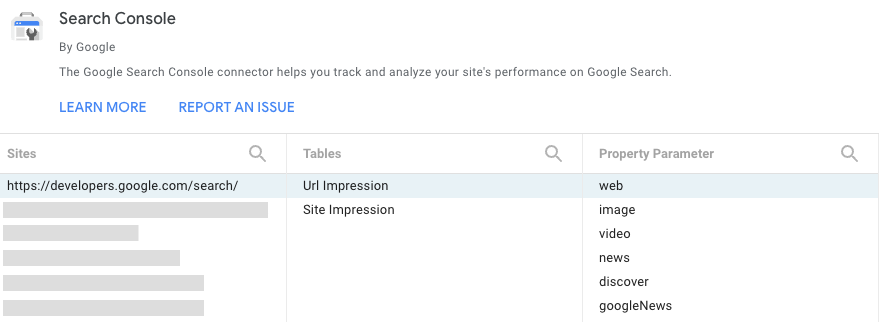 Official Google Search Console performance dashboard inside Looker Studio displaying organic clicks, impressions, CTR, and average position trends (Source: Google Search Central).
Core Reporting & Visualization Features
- Direct Native Google Connectors: Connect any verified Google Search Console property (giving you access to both the Site Impression table for site-wide totals and the URL Impression table for page-level performance) alongside Google Analytics 4, Google Sheets, and BigQuery for $0.
- Data Blending (Up to 5 Sources): Join Google Search Console and GA4 data on a shared key (such as Landing Page path or Date) to show search impressions, organic clicks, engagement rate, and conversions side by side in a single unified table.
- Interactive Controls & Filters: Add drop-down filters for Date Range, Device Category (Mobile vs. Desktop), Country, or regex query filters (e.g., separating Branded vs. Non-Branded search queries).
- Custom Branding & Multi-Page Layouts: Upload client logos, apply custom color palettes automatically extracted from your logo, and structure reports across multiple pages (Executive Summary, Keyword Performance, Technical Core Web Vitals, Conversions).
Export, Sharing & Automation Limits (Free vs. Pro)
- Interactive Link Sharing: Share live view-only or edit links (similar to Google Docs) with clients, or embed the live dashboard inside an internal Notion wiki or client portal via
<iframe>. - Scheduled Email PDF Delivery: The free version of Looker Studio includes built-in email scheduling (Share > Schedule delivery). You can configure 1 automated schedule per report (daily, weekly, or monthly) that sends a visual preview and a downloadable PDF attachment to your recipients.
- Looker Studio Free vs. Pro ($9/user/project/month): You do not need Looker Studio Pro for standard SEO reporting. Pro only adds organizational asset ownership (via Google Cloud projects), up to 20 delivery schedules per report, custom email subject/body text, and Slack/Google Chat delivery.
- Crucial PDF Export Caveat: Looker Studio’s PDF generator captures the visible canvas of each report page; it does not automatically paginate scrollable tables across multiple PDF pages. If a keyword table has 500 scrollable rows, the PDF attachment will only show the top 10–20 visible rows. Design PDF-bound reports using fixed Top-10 tables and summary scorecards.
Best For: Freelancers, in-house SEOs, and agencies that want unlimited, customizable client dashboards and automated monthly PDF reports using Google Search Console, GA4, and Google Sheets data.
2. Google Search Console (GSC) & Search Console Insights: Best First-Party Search Data Source
- Role: Official Google Search & Indexing Data Source | Free Plan: 100% Free Forever (Verified domains) | Data Retention: 16 months | UI Export Limit: 1,000 rows (CSV, Google Sheets, Excel)
Google Search Console (search.google.com/search-console) is the primary source of truth for organic Google search performance. While it is primarily a diagnostic and data-collection portal rather than a presentation builder, its built-in reporting views and Search Console Insights interface make it indispensable.
Core Reporting Capabilities
- Search Performance Reports: Tracks verified Clicks, Impressions, Average CTR, and Average Position across Web, Image, Video, and News search. You can filter and compare date ranges (e.g., Last 28 days vs. Previous period, or Year-over-Year) across Queries, Pages, Countries, Devices, and Search Appearance.
- Search Console Insights: A simplified, visual reporting view tailored for content creators and non-technical small business owners. It highlights top-performing content, trending articles, and top search queries driving traffic over the last 28 days without overwhelming tables.
- Page Indexing & Core Web Vitals Reports: Tracks indexed vs. unindexed URL counts and real-world Chrome User Experience Report (CrUX) performance across LCP, INP, and CLS.
Export, Sharing & Limitations
- 1,000-Row Web Interface Cap: Exporting any table directly from the GSC web interface to CSV, Google Sheets, or Excel is strictly capped at 1,000 rows. However, connecting GSC to Looker Studio, Google Sheets (via API add-ons), or BigQuery bypasses this UI ceiling and unlocks up to 25,000–50,000 rows per API request.
- 16-Month Rolling Window: GSC only retains the last 16 months of search performance data. Once month 17 passes, that historical data disappears unless you archive it externally in Google Sheets or BigQuery.
- No Native PDF Report Builder: GSC cannot generate formatted multi-section PDF reports with executive commentary.
Best For: Every website owner and SEO specialist as the foundational data engine feeding Looker Studio and Google Sheets.
3. Google Analytics 4 (GA4): Best Free Organic Traffic & Conversion Reporting
- Role: Web Analytics & Conversion Attribution Platform | Free Plan: 100% Free (Standard GA4) | Core SEO Value: Ties organic search landings to revenue and Key Events | Exports: PDF, CSV, Google Sheets, Scheduled Emails
Google Search Console tells you what happens before a user clicks onto your site; Google Analytics 4 (GA4) (analytics.google.com) reports what those organic visitors actually do after they land. Without GA4, an SEO report can only show traffic volume—not business value.
Core SEO Reporting Features
- Native Google Search Console Integration: By linking your GSC property inside GA4 Admin > Product Links > Search Console Links and publishing the collection in your GA4 Library, you unlock two dedicated reports directly inside GA4: Queries (organic Google queries) and Google Organic Search Traffic (combining GSC impressions/clicks with GA4 engaged sessions and Key Events by landing page).
- Traffic Acquisition & Landing Page Reports: Filter by
Session primary channel group = Organic Searchto report on organic sessions, engaged sessions, engagement rate, average engagement time, and conversions across Google, Bing, DuckDuckGo, and Brave. - Custom Explorations: Build free-form pivot tables, funnel reports, and path explorations to show how organic blog readers navigate to product or lead-generation pages.
- Built-In Scheduled Email Reports: Inside standard GA4 reports, click Share this report > Schedule email to send automated daily, weekly, or monthly PDF or CSV attachments to up to 50 recipients (active for up to 12 months per schedule).
Limitations
- Steep Learning Curve for Clients: Sharing direct GA4 access with non-technical clients often causes confusion; piping GA4’s
Organic Searchsegment into Looker Studio produces much cleaner client reports. - Exploration Data Retention: Standard free GA4 properties cap raw user-level and event-level retention for custom Explorations at 2 months or 14 months (make sure to change the default setting from 2 months to 14 months under Admin > Data collection and modification > Data retention).
Best For: Reporting organic conversions, lead generation, e-commerce revenue, and post-click user engagement across all search engines.
4. Google Sheets + Search Analytics for Sheets: Best Free Historical Archiver & Custom KPI Builder
- Role: Spreadsheet Reporting Engine & Automated GSC API Connector | Free Plan: 100% Free | Row Capacity: 25,000+ rows per GSC API pull (up to 10M cells per workbook) | Automation: Scheduled daily, weekly, or monthly API backups
For technical SEOs and lean agencies, Google Sheets paired with the free Search Analytics for Sheets add-on (searchanalyticsforsheets.com / Google Workspace Marketplace) is the secret weapon of zero-cost SEO reporting.
Why It Solves Major Free Reporting Gaps
- Bypasses GSC’s 1,000-Row UI Limit: Because the add-on queries the official Google Search Console API directly, you can pull 25,000+ rows of query and page data into a spreadsheet in seconds.
- Automated Historical Backups (Beats the 16-Month Cap): You can enable the built-in Backup scheduler to automatically pull your GSC performance data every month (or week/day) and append it to a master Google Sheet. Over time, you build a permanent multi-year SEO database without paying for BigQuery storage.
- Free Staging Layer for Looker Studio: If you want to include data from tools that lack a free Looker Studio connector (such as exported CSVs from Ahrefs Webmaster Tools, Bing Webmaster Tools, or Screaming Frog), paste them into tabs in Google Sheets and connect that Sheet to Looker Studio using Google’s free native Sheets connector.
- Custom Calculated Metrics: Use standard spreadsheet formulas (
REGEXMATCH,QUERY,VLOOKUP,XLOOKUP) to categorize keywords by search intent, calculate Branded vs. Non-Branded click share, or track month-over-month pacing against targets.
Limitations
- Google Sheets enforces a hard ceiling of 10 million cells per workbook, and complex array formulas slow down noticeably once a sheet exceeds 50,000 to 100,000 rows.
Best For: SEOs who want automated monthly keyword archives beyond 16 months, custom Branded vs. Non-Branded segmentation, and a free bridge to bring non-Google CSV data into Looker Studio.
5. Databox (Free Plan): Best Free Executive KPI Dashboard for Solo Marketers
- Role: Cloud Business Intelligence & KPI Dashboard Platform | Free Plan: Permanent Free Tier ($0/month, 1 user) | Free Allowances: 1 Dashboard (Databoard), 3 Data Sources, 10 Custom Metrics | Sync Frequency: Daily
Despite occasional confusion online, Databox (databox.com) continues to maintain a permanent Free Forever Plan designed for solo founders, freelancers, and individual site owners who want a polished executive dashboard without designing layouts from scratch in Looker Studio.
Core Reporting Capabilities
- Plug-and-Play SEO Templates: Connect Google Search Console and Google Analytics 4 (using 2 of your 3 free data source slots) and populate pre-built visual KPI cards showing clicks, impressions, organic sessions, and goal completions in under five minutes.
- Daily Automated Refresh: Your dashboard updates automatically once every 24 hours on the free tier.
- AI Performance Summaries (Genie): Includes 50 monthly AI credits to generate automated narrative summaries explaining traffic spikes or drops.
- Live Shareable Link & Snapshot Exports: Share a public or password-protected link to your live Databoard or export visual snapshots for presentations.
Free Plan Limits
- Strict 1-Dashboard / 3-Data-Source Ceiling: You can only maintain 1 active dashboard and connect 3 total data sources for free. You cannot manage multiple clients on a single free account.
- 11-Month Historical Window: The Free plan restricts historical data lookbacks to 11 months.
- No White-Labeling: Databox branding is displayed on free dashboards, and upgrading to paid plans starts around $71 to $89+/month (billed annually).
Best For: Small business owners and solo founders who manage a single website and want an attractive, zero-maintenance KPI scorecard combining GSC and GA4.
6. Matomo On-Premise: Best Free Self-Hosted Analytics with White-Label Scheduled PDF Reports
- Role: Open-Source Web Analytics & Automated Report Generator | License: GPLv3 (100% Free Self-Hosted) | Free Limits: Unlimited websites, users, segments & scheduled PDF reports | Branding: Custom Logo & Full Domain Ownership
If your top priority is 100% data ownership, GDPR privacy compliance, and automated white-label PDF email reports without paying per-client SaaS fees, Matomo On-Premise (matomo.org) is the strongest open-source option available.
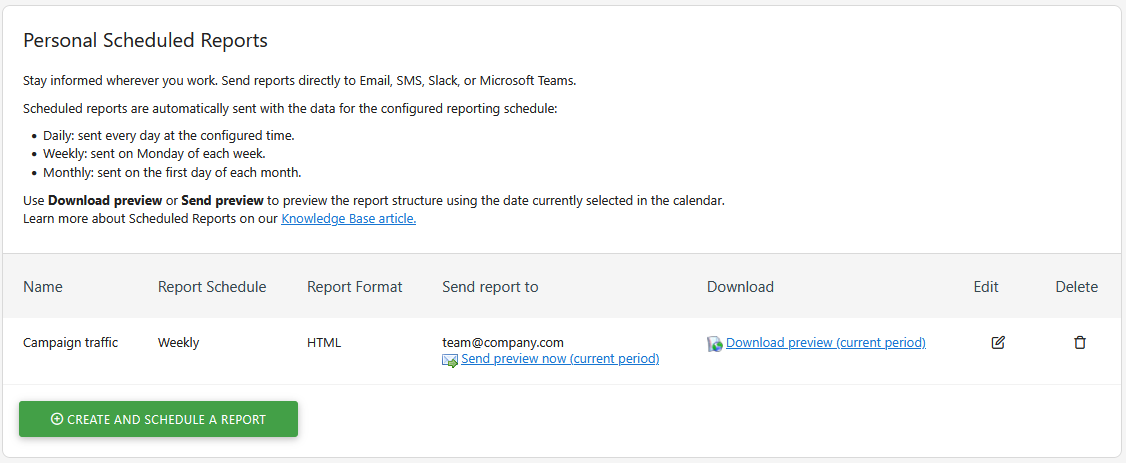 Matomo’s built-in Scheduled Reports interface allows administrators to configure automated daily, weekly, or monthly PDF, HTML, and CSV reports (Source: Matomo Documentation).
Core SEO & Reporting Capabilities
- Built-In Scheduled Email Reports (PDF, HTML, CSV): Out of the box, Matomo On-Premise allows you to create unlimited custom email reports (Administration > Personal > Email reports). You can select specific SEO and traffic widgets, upload your custom agency or company logo, and schedule automatic daily, weekly, or monthly delivery via server cron job.
- 100% Unsampled Traffic & Conversion Data: Tracks organic search engine referrals, landing page bounce and conversion rates, Ecommerce revenue, outlinks, downloads, and site speed across unlimited properties.
- True Self-Hosted Sovereignty: Because it runs on your own PHP/MySQL server or VPS, dashboards live on your own domain and emails send through your own SMTP server—eliminating third-party SaaS branding.
Crucial Limitation: The Paid Keyword Plugin Distinction
- What Is Free vs. Paid on On-Premise: While Matomo On-Premise is 100% free and includes organic landing page reports, referrer tracking, and scheduled PDF reports in its core, importing granular keyword impressions, clicks, and average positions from Google Search Console and Bing Webmaster Tools inside Matomo requires the paid Search Engine Keywords Performance Marketplace plugin (an annual commercial add-on). If you want 100% free keyword-level reporting alongside Matomo, pair Matomo with Looker Studio or GSC directly.
Best For: Technical agencies, privacy-first European businesses, and developers who have a web server and want unlimited, custom-branded scheduled PDF traffic reports across multiple websites.
7. Semrush (Free Account Tier — My Reports): Best Free All-in-One PDF Builder for 1 Site
- Role: Commercial SEO Platform with Drag-and-Drop PDF Builder | Free Plan: Permanent Free Account (1 project, 1 Base Report slot) | Scheduled Delivery: Up to 3 email recipients | Exports: Standard PDF (up to 50 images per file)
While Semrush (semrush.com) is a premium commercial suite, its permanent Free Account Tier includes a rarely discussed perk inside its My Reports module: 1 free Base Report slot.
Core Reporting Capabilities
- Drag-and-Drop PDF Report Builder: Unlike Looker Studio (which is built primarily for live web dashboards), Semrush’s My Reports is purpose-built for multi-page PDF documents. You can drag in text blocks, section headers, and widgets from Semrush’s Domain Overview, Site Audit (up to 100 pages/month on free), Position Tracking (up to 10 keywords on free), plus live native widgets from Google Search Console and Google Analytics 4.
- Automated Email Scheduling: Even on a Free account, you can schedule your 1 Base Report to run automatically (daily, weekly, or monthly) and email the finished PDF to up to 3 recipients.
Free Plan Limits
- 1 Base Report Slot Only: A Free account is strictly capped at 1 active Base Report. To generate a different report template or report on a second website, you must delete your existing report or upgrade.
- No White-Labeling: Exported PDFs include Semrush branding; white-label themes and custom email branding require paid plans plus the Agency Growth Kit add-on.
- Tight Underlying Semrush Quotas: The free account only tracks 10 keywords and crawls 100 pages per month, though the embedded GSC and GA4 widgets inside My Reports pull your full Google data.
Best For: Freelancers or small business owners managing a single website who prefer a formatted, magazine-style monthly PDF report over an interactive dashboard.
8. Bing Webmaster Tools & Ahrefs Webmaster Tools: Best Free Supplementary Data Sources
- Role: Verified-Domain Data Sources for Backlinks, Site Health & Multi-Engine Search | Free Plan: 100% Free for verified domains | Reporting Output: Automated health emails & CSV exports (up to 1,000 rows in AWT)
Google Search Console has two blind spots when building a comprehensive SEO report: it only shows a limited sample of linking domains (with zero authority metrics or lost-link alerts), and it only tracks Google search. Adding Ahrefs Webmaster Tools (AWT) (ahrefs.com/webmaster-tools) and Bing Webmaster Tools (bing.com/webmasters) fills both gaps for $0.
What They Add to Your Reporting Stack
- Ahrefs Webmaster Tools (Backlinks & Site Health): Free for any domain you verify via GSC or DNS. It sends automated weekly or monthly email crawl reports summarizing your technical Health Score (across 5,000 free monthly crawl credits) and lets you view and export up to 1,000 rows of live backlinks, referring domains, and organic keywords via CSV.
- Bing Webmaster Tools (Bing & AI Search Visibility): Verified in one click via GSC import. It provides search performance reports (clicks, impressions, keywords) for Microsoft Bing—which also underpins search retrieval for DuckDuckGo, Yahoo, and AI assistants like Microsoft Copilot—plus a free Backlink Explorer and 10,000-page monthly Site Scan.
Reporting Limitations
- No Free Native Looker Studio Connectors: Neither Ahrefs nor Bing provides a free native connector for Looker Studio (Ahrefs’ official Looker Studio integration requires an expensive Enterprise/API plan). To display AWT backlink growth or Bing traffic inside Looker Studio for free, export the CSV summary once a month and paste it into a connected Google Sheet.
Best For: Enriching your monthly SEO reports with verified backlink acquisition data, referring domain counts, technical health scores, and Bing/AI search traffic.
Best Free SEO Reporting Setup: How to Combine Tools for $0
Because no single free tool handles data collection, keyword archiving, backlink tracking, and PDF dashboard visualization alone, the smartest approach is to connect four free tools into a unified pipeline.
flowchart TD
    subgraph Sources["1. Free First-Party Data Sources"]
        GSC["Google Search Console<br/>(Clicks, Impressions, CTR, Position)"]
        GA4["Google Analytics 4<br/>(Organic Sessions & Conversions)"]
        AWT["Ahrefs & Bing Webmaster Tools<br/>(Top 1,000 Backlinks & Health CSV)"]
    end

    subgraph Staging["2. Free Staging & Archiving Layer"]
        Sheets["Google Sheets + Search Analytics Add-on<br/>(25k+ Row Monthly Backup & CSV Staging)"]
    end

    subgraph Visual["3. Free Visualization & Delivery Layer"]
        Looker["Google Looker Studio<br/>(Interactive Multi-Page SEO Dashboard)"]
        Output1["Live Interactive Client URL<br/>(Dynamic Date & Device Filters)"]
        Output2["Automated Scheduled Email PDF<br/>(1 Free Monthly Schedule / Report)"]
    end

    GSC -->|"Native Free Connector"| Looker
    GA4 -->|"Native Free Connector"| Looker
    GSC -->|"Automated Monthly API Pull"| Sheets
    AWT -->|"Monthly CSV Paste"| Sheets
    Sheets -->|"Native Free Sheets Connector"| Looker
    Looker --> Output1
    Looker --> Output2
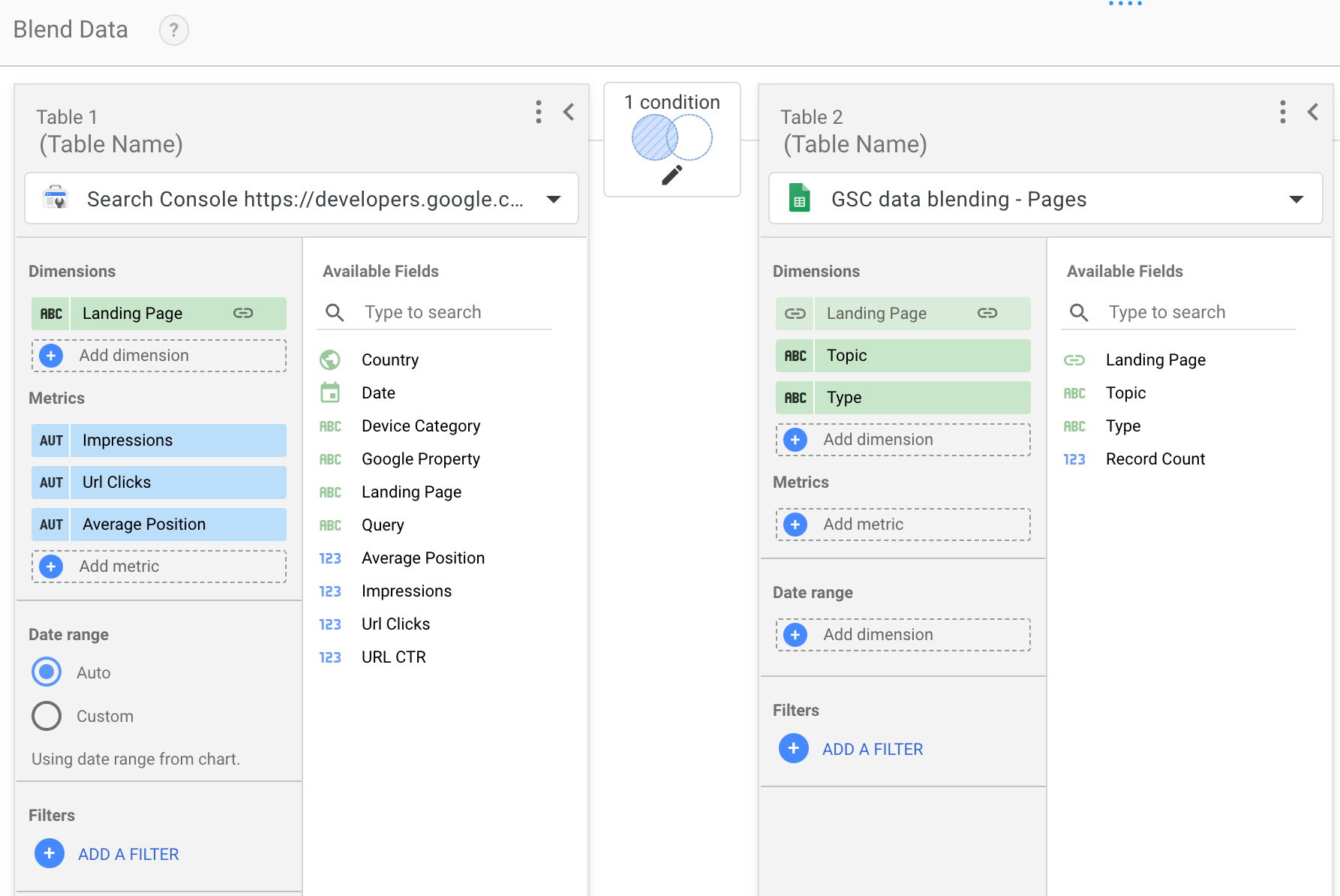 Configuring a native data blend in Google Looker Studio to join Google Search Console impressions, clicks, and CTR with internal page attributes on a shared URL key (Source: Google Search Central).
How to Create a Free Automated SEO Report (Step-by-Step Procedure)
You can build a reusable, automated SEO report in under 30 minutes using the workflow above. Here is the exact procedure:
Step 1: Link Google Search Console to GA4
- Open Google Analytics 4 > Admin > Product links > Search Console links and link your verified GSC property to your GA4 web data stream.
- Ensure your primary business goals (form submissions, signups, purchases) are marked as Key Events in GA4 so your report tracks business outcomes rather than vanity clicks.
Step 2: Connect Your Sources in Google Looker Studio
- Open
lookerstudio.google.com, click Blank Report, and select the native Google Search Console connector. - Add your verified property twice:
- Connect the Site Impression table (use this for site-wide total Clicks, Impressions, CTR, and Average Position scorecards so multi-URL queries are not double-counted).
- Connect the URL Impression table (use this for Landing Page breakdown tables).
- Click Add data in the top toolbar and connect your Google Analytics 4 property ( plus your Google Sheet if you are archiving historical data or pasting Ahrefs backlink totals).
Step 3: Structure a 3-Page Report That Exports Cleanly to PDF
To prevent Looker Studio’s PDF generator from cutting off long scrollable tables, structure your report into three focused pages with fixed-row tables (e.g., Rows per page = 10):
- Page 1 — Executive Summary & Conversions (GA4 + GSC Site Table): 4 KPI scorecards at the top (Organic Clicks, Impressions, Engaged Organic Sessions, Organic Key Events) with Month-over-Month (
MoM) comparison deltas, followed by a 12-month trendline chart and a 3-bullet text box for your manual executive commentary. - Page 2 — Keyword & Content Winners (GSC URL & Query Tables): Two side-by-side 10-row tables showing Top 10 Non-Branded Queries by Clicks and Top 10 Growing Landing Pages, plus a filter for Mobile vs. Desktop performance.
- Page 3 — Technical Health, Speed & Authority (GSC + Sheets): Core Web Vitals status (LCP, INP, CLS pass rates) and a summary scorecard of new referring domains and crawl health pulled from your Ahrefs Webmaster Tools / Bing monthly CSV sheet.
Step 4: Configure Automated Monthly Email PDF Delivery
- Click the dropdown arrow next to Share in the top-right corner of Looker Studio and select Schedule delivery.
- Add your client or stakeholder email addresses.
- Set the recurrence to Monthly (for example, on the 3rd day of every month at 8:00 AM—giving Google Search Console’s 48-hour data processing delay time to finalize the previous month’s numbers).
- Click Save. Looker Studio will now compile and email the PDF report automatically every month for $0.
(Tip: If you want to trigger custom multi-step notifications in Slack, Discord, or project management boards when monthly metrics update, you can pair Google Sheets with the self-hosted tools covered in our guide to the best workflow automation software in 2026).
Video Tutorial: Building a Google Search Console SEO Report in Looker Studio
To see how to connect Google Search Console tables, configure date range controls, and lay out visual SEO scorecards inside Looker Studio, watch this step-by-step tutorial:
This walkthrough demonstrates how to connect Google Search Console to Looker Studio, distinguish between Site and URL impression tables, and build interactive keyword and landing page views.
Manual vs. Automated SEO Reports: What Can You Actually Automate for Free?
A common frustration is trying to automate 100% of an SEO report without paying for API connectors—and ending up with a generic chart dump that clients never read. The table below shows what you can automate for free versus what still requires human input:
| Reporting Task | 100% Free Automated Method | Manual / Semi-Automated Method | Paid SaaS Equivalent ($100+/mo) |
|---|---|---|---|
| Google Clicks, Impressions & Queries | Live native GSC connector in Looker Studio | Exporting 1,000 rows from GSC UI | Automated GSC widget in AgencyAnalytics |
| Organic Sessions & Conversions | Live native GA4 connector in Looker Studio | Copying numbers from GA4 Acquisition table | Native GA4 integration in Whatagraph |
| 16+ Month Historical Keyword Archive | Scheduled monthly API backup in Search Analytics for Sheets | Downloading monthly CSV files manually | Multi-year storage in SE Ranking / Ahrefs |
| Monthly PDF Report Delivery | 1 free scheduled email per Looker Studio report (or Matomo cron) | Downloading PDF and emailing manually | Multi-schedule white-label emailer |
| Backlink & Technical Health Totals | Automated email alerts from Ahrefs Webmaster Tools | Monthly 2-minute CSV copy-paste into Google Sheets | Paid Supermetrics connector + Ahrefs API |
| Executive Insights & Next Steps | Cannot be fully automated (AI summaries lack business context) | 10-minute monthly review writing 3 action bullets | Manual analyst notes in agency suites |
Reporting for Clients and Small Agencies: How to Handle White-Label Limits
If you are a freelancer or boutique agency reporting to paying clients on a $0 software budget, you will run into two practical hurdles: URL branding and report clutter. Here is how experienced consultants handle them without paying for enterprise reporting tools:
- Duplicate a Master Looker Studio Template per Client: Build one clean, battle-tested 3-page Looker Studio report with your agency’s color palette and typography. For each new client, click Make a copy, swap the underlying Google Search Console and GA4 data sources to the client’s verified properties, and place the client’s logo in the top header.
- Use PDF Delivery or Portal Embeds to Minimize “Google” Branding: While a direct link to
lookerstudio.google.comshows the Looker Studio interface bar to logged-in users, the downloaded or scheduled PDF attachment is completely clean—displaying only your canvas design and custom logo. Alternatively, you can embed the Looker Studio report via<iframe>inside a password-protected page on your own agency website or client portal. - Never Send Uninterpreted Charts: Clients do not churn because a dashboard was built in Looker Studio instead of a $300/month agency platform; they churn when they receive 15 pages of charts without knowing what work was done and how it affected leads or sales. Always dedicate the top box of Page 1 to three plain-English bullets: What Changed, Why It Changed, and What We Are Executing Next Month.
What Free SEO Reporting Tools Cannot Do
To keep expectations realistic, here are the hard boundaries where free SEO reporting tools stop and paid platforms begin:
- No Automated Competitor Rank Tracking: Google Search Console only reports average positions for queries where your own domain earned impressions. Free tools cannot automatically track daily SERP positions for 500 target keywords across 5 competitors—that requires paid rank trackers (like SE Ranking, Ahrefs, or Semrush Pro).
- No Automated Third-Party Backlink Blending: Pulling live Ahrefs, Moz, or Majestic backlink metrics directly into Looker Studio via API requires both a paid SEO subscription and a paid connector. On a free stack, backlink reporting requires a manual monthly CSV export from Ahrefs Webmaster Tools or Bing Webmaster Tools.
- No Multi-Channel Paid + Organic Ad Rollups (Beyond Google): While Google Ads, YouTube, GSC, and GA4 connect to Looker Studio for free, automatically blending Meta Ads, LinkedIn Ads, TikTok, and CRM pipeline data into the same dashboard requires paid ETL connectors.
- No Native AI Answer Engine (GEO) Share-of-Voice Tracking: Free webmaster tools do not automatically track how often ChatGPT, Perplexity, or Claude cite your brand compared to competitors. For those capabilities, see our dedicated guide to the best Generative Engine Optimization (GEO) tools.
Which Free SEO Reporting Tool Should You Choose?
Match your specific role and constraint to our final recommendation:
- Choose Google Looker Studio + GSC + GA4 if you want the most powerful, 100% free interactive dashboard and automated monthly PDF reporting setup for yourself or your clients.
- Add Google Sheets (+ Search Analytics for Sheets) if you have a content-heavy site with more than 1,000 ranking keywords and want automated monthly historical backups that never expire after 16 months.
- Choose Databox (Free Plan) if you manage a single small business website, dislike designing layouts in Looker Studio, and just want 1 clean executive dashboard combining GSC and GA4.
- Choose Matomo On-Premise if you manage your own Linux/PHP server, prioritize strict GDPR data privacy, and want unlimited custom-branded PDF traffic reports emailed via cron job.
- Choose Semrush (Free Account Tier) if you only manage 1 website and want a quick drag-and-drop PDF report builder that emails up to 3 stakeholders without building a dashboard.
Frequently Asked Questions (FAQ)
Can I create an automated SEO report for free without a credit card?
Yes. By connecting Google Search Console and Google Analytics 4 to Google Looker Studio, you can build a multi-page SEO dashboard and configure 1 free scheduled email delivery per report (daily, weekly, or monthly) that automatically sends a PDF attachment to your team or client at zero cost.
Is Google Looker Studio completely free for SEO reporting?
Yes, the core version of Google Looker Studio is 100% free forever with unlimited reports and viewers, and all official Google connectors (Search Console, GA4, Google Sheets, BigQuery, CSV) are free. You only pay if you choose to subscribe to third-party partner connectors (like Supermetrics or Funnel) to pull non-Google data, or if your enterprise upgrades to Looker Studio Pro ($9/user/project/month) for cloud asset governance.
Which free SEO reporting tools allow PDF export?
Google Looker Studio, Google Analytics 4, Google Sheets, Matomo On-Premise, and Semrush’s Free Account Tier (1 Base Report slot in My Reports) all support direct PDF exports and scheduled email PDF attachments for free.
Are there any free white-label SEO reporting tools for agencies?
In cloud software, Google Looker Studio allows free custom branding (uploading client/agency logos, custom color palettes, and clean PDF downloads without header bars), though the live web URL remains on lookerstudio.google.com. For true domain and SMTP white-labeling at zero software cost, Matomo On-Premise (self-hosted open-source) lets you send custom-branded PDF email reports from your own server and domain.
Do AgencyAnalytics, Whatagraph, or SE Ranking have a free plan?
No. AgencyAnalytics and SE Ranking offer a 14-day free trial, and Whatagraph offers a trial/demo, but none of them provide a permanent free tier. Once the trial expires, you must pay a monthly subscription to keep accessing or sending your client reports.
How do I bypass Google Search Console's 1,000-row export limit for free?
Instead of clicking the Export button inside the Google Search Console web interface (which caps exports at 1,000 rows), connect your GSC property directly to Google Looker Studio or use the free Search Analytics for Sheets add-on in Google Sheets. Both methods query the official Search Console API and can retrieve 25,000 to 50,000 rows per request for free.
What metrics should every monthly SEO report include?
A high-impact monthly SEO report should focus on five core areas: 1) Business Outcomes (organic conversions / Key Events and revenue from GA4), 2) Organic Traffic Volume (engaged organic sessions and clicks from GA4 & GSC), 3) Search Visibility (impressions, CTR, and average position separated by Branded vs. Non-Branded queries), 4) Top Growing & Declining Landing Pages, and 5) Technical Health & Authority (indexation status, Core Web Vitals, and new referring domains).

Yan ZC
Software Developer & Tech Reviewer
Software developer and tech reviewer at ToolReview. I test, analyze, and document AI tools and software workflows. My mission is to help you find the perfect tech stack with honest reviews and rigorous benchmarks.